
PSA Appointment for National ID
No online booking needed. Walk in, register, and get your PhilSys National ID in a single visit. Here is everything you need to know.

A lot of Filipinos search for a PSA appointment for National ID, assuming they need to book a slot online before they can register, and that confusion costs them time they did not need to spend. The truth is that the Philippine Statistics Authority has moved to a fully streamlined walk-in system for PhilSys National ID registration as of 2026, which means no online form, no prior booking, and no waiting for a slot to open up. You just need to show up at the right place with the right documents. This guide breaks down the entire process so you walk in prepared and walk out with your transaction done.
Whether you are registering for the first time, helping a family member get their PhilID, or trying to understand what happened to the old online appointment portal, this article answers everything clearly and in the right order.
What Is the PSA National ID and Why Do You Need It?
The PhilSys National ID, also called the PhilID, is a government-issued identification card that assigns every Filipino citizen and resident alien a unique permanent 12-digit PhilSys Number or PSN. The PSA implements this program under Republic Act 11055, also known as the Philippine Identification System Act. The card carries your full name, date of birth, address, blood type, and a secure QR code that government agencies and private institutions can verify instantly.
This same ID also unlocks a major practical benefit that most Filipinos overlook. When you hold a PhilSys National ID, you can walk into any PSA Civil Registration System outlet without booking an appointment and collect civil registry documents like your birth certificate, marriage certificate, or CENOMAR for yourself and your family members. That alone makes registration worth prioritizing if you have been putting it off.

Do You Still Need a PSA Appointment for National ID Registration?
No, as of 2026, the PSA has permanently discontinued the online pre-registration requirement for PhilSys National ID registration. The old portal at register.philsys.gov.ph no longer accepts new appointment bookings for first-time registrants. The PSA now runs a fully walk-in system where you complete your entire registration in a single visit to any PhilSys Registration Center near you.
Many Filipinos still land on outdated guides that walk them through an online booking process that no longer exists. Do not spend time searching for an appointment form or waiting for a portal to reopen. That step has been removed entirely from the process. Just gather your documents and go.
Who Can Register for the PhilSys National ID?
The Philippine National ID is open to the following individuals:
- All Filipino citizens, regardless of age, including infants from 1 year old and above. Registration is completely free.
- Resident aliens who have lived in the Philippines for at least six consecutive months with valid immigration documents. A registration fee of PHP 500 applies to resident aliens.
- Overseas Filipinos, who can register through Philippine embassies and consulates abroad at no cost.
Children aged 1 to 4 years old undergo a simplified registration that captures a photo and basic information linked to the parent or guardian. Children aged 5 and above go through full biometric collection. At age 15, the PSA recaptures biometric data during a follow-up visit to reflect updated physical characteristics.
Requirements for PSA National ID Registration
Prepare one of the following primary supporting documents before you head to a registration center. You only need one from this list to qualify for registration.
Primary Supporting Documents (Pick One)
PSA Birth Certificate + Photo ID
PSA issued Birth Certificate plus any valid government-issued photo ID
Philippine Passport
Valid or expired within the last year
UMID Card
Issued by SSS or GSIS
Driver’s License
Issued by the Land Transportation Office
Secondary Documents (If You Have No Primary ID)
If you do not have any of the primary documents listed above, the PSA accepts a combination of secondary documents. Accepted secondary IDs include the following:
- Barangay ID or Barangay Certificate with photo
- Voter’s ID or Certificate of Registration from COMELEC
- PhilHealth ID card
- Postal ID
- School ID for students currently enrolled
- Company ID from a registered employer
- NBI Clearance or Police Clearance
- PWD ID or Senior Citizen ID
Bring original documents only. The PSA evaluator will not accept photocopies as your primary submission. Make sure your name, birthdate, and address appear consistently across all documents you bring because any discrepancy can flag your application during the verification step.
Where to Register for Your PhilSys National ID?
The PSA has set up PhilSys Registration Centers across the country in accessible locations so most Filipinos do not need to travel far. You can find registration centers at the following types of locations:
PSA Offices
Provincial and regional offices across all major islands
Shopping Malls
SM, Robinsons, and Ayala Malls
LGU Offices
Municipal and city-level government offices
Barangay Centers
Select community centers
Mobile Units
Remote barangays, coastal areas, and islands
The PSA also runs two special mobile programs for communities that cannot easily access fixed centers. The National ID on Wheels program deploys registration vans that visit far-flung barangays and public spaces. The National ID on Boat program uses bangka boats to reach coastal and island communities. Both programs follow the same registration process as fixed centers.
Most centers operate Monday to Friday from 8 AM to 5 PM. Some mall-based centers open on weekends, depending on the location. Visit philsys.gov.ph to find the nearest registration center in your area.

How to Register for Your PSA National ID: Step by Step
The registration process now takes place entirely in one visit. The PSA estimates that each registration takes 30 to 60 minutes, depending on the queue at your chosen center.
Locate the Nearest Center
Locate the nearest PhilSys Registration Center using the official PSA website at philsys.gov.ph or by contacting your local government office. Choose a center that is accessible to you and check if it operates on the day you plan to visit.
Gather Your Documents
Gather your primary supporting document before you leave the house. Bring the original copy since the PSA will not process photocopies as your main submission.
Walk In and Wait
Arrive at the registration center and proceed to the reception or queuing area. No appointment slip or booking reference is needed. Just walk in and wait for your turn.
Document Verification
Present your supporting documents to the PSA Registration Kit Operator or RKO at the counter. The officer will verify your identity and check that your documents match the information you provide. Watch the screen carefully as they enter your details and speak up immediately if anything looks incorrect.
Demographic Data Encoding
Complete demographic data encoding at the station. The officer will enter your full name, date of birth, blood type, home address, marital status, and contact details into the national system. Review each field before you confirm.
Biometric Data Collection
Undergo biometric data collection. The PSA captures your fingerprints from all ten fingers, an iris scan of both eyes, and a front-facing photograph. This step takes only a few minutes and requires no special preparation.
Get Your TRN
Receive your Transaction Reference Number or TRN after the biometric collection is complete. The officer will hand you a transaction slip carrying this number. Keep it safe because you will use it to track the delivery of your physical PhilID card.
Download Your Digital ID
Download your Digital National ID immediately through the eGovPH app on your smartphone. This digital version carries the same legal validity as the physical card and works for banking, government transactions, and private sector use right away.
The Three Formats of the PhilSys National ID
Many applicants get confused at this stage because the PSA issues the PhilID in three different formats. Understanding each one saves you from unnecessary follow-ups or complaints.
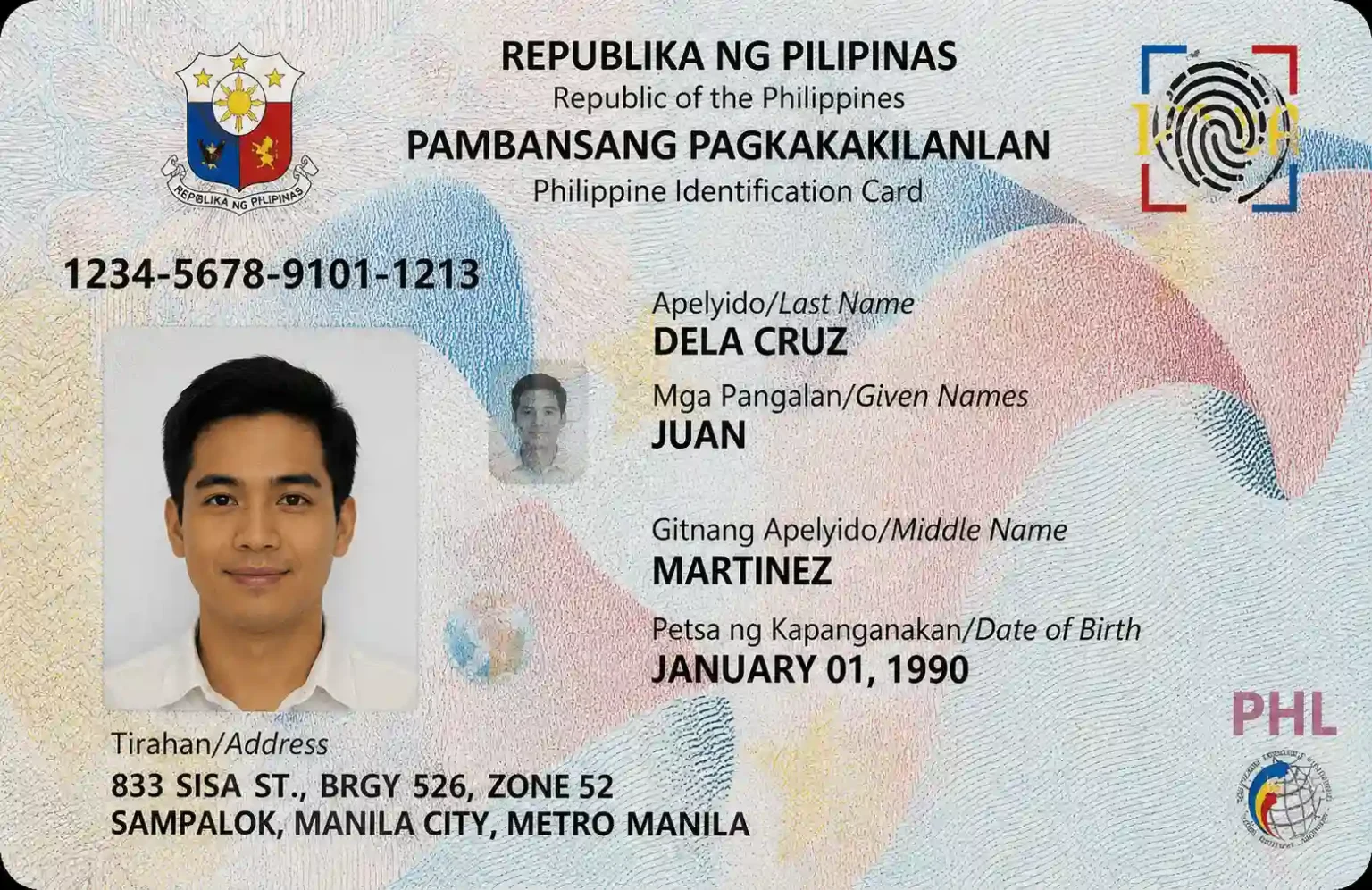
Physical PhilID Card
This is the permanent polycarbonate card that the Bangko Sentral ng Pilipinas prints and the PHLPost delivers to your registered home address. It carries your photo, full name, PSN, and a secure QR code. The physical card has no expiry date for Filipino citizens. Resident aliens receive a card that expires in line with their visa validity.
Printed ePhilID Slip
The PSA issues this printed paper version immediately after your registration as temporary proof that you have completed the process. Some institutions accept this while your physical card is still in production. It is not a permanent replacement for the card itself, but it carries legal validity in the meantime.
Digital National ID via eGovPH App
This is the digital version of your PhilID that you can download through the eGovPH app as soon as your registration is processed. It carries the same legal weight as the physical card and works across banks, government agencies, and private employers. Download it right after your visit so you have usable identification while you wait for the physical card to arrive.
How Long Does It Take to Receive the Physical PhilID?
The PHLPost delivers your physical PhilID card to the address you provided during encoding, after your registration. Delivery timelines vary depending on your location and the current production volume at the BSP. Urban areas generally receive cards faster than remote provinces.
Track your card delivery using your Transaction Reference Number or the TRN through the official PhilSys tracking page at philsys.gov.ph. If your card does not arrive within the expected period, contact the PSA helpline for follow-up assistance.
What the PhilSys National ID Unlocks for You?
Registering for your PhilSys National ID does more than give you a government-issued card to carry around. Here is what it actively opens up for you:
Walk-In PSA Access
Walk-in access at PSA outlets without booking an appointment to collect civil registry documents for yourself and family members.
Faster Banking
Faster bank account opening since most banks accept the PhilID as a standalone primary ID.
Streamlined Government
Streamlined government transactions at SSS, PhilHealth, Pag-IBIG, and LTO offices.
Priority Lanes
Priority lane privileges at select government offices, when combined with your senior citizen or PWD status.
Digital Verification
Digital verification through the QR code for employers, schools, and financial institutions.
eGovPH App Access
Access to the eGovPH app, which consolidates multiple government services in a single platform.
This is something every applicant needs to know before and after registration. A number of illegal fixers actively operate on Facebook and other social media platforms, offering to print physical PhilID cards for a fee. These are scams, and the cards they produce are fake.
The Bangko Sentral ng Pilipinas is the only institution legally authorized to print physical PhilID cards. No private individual, printing shop, or Facebook page holds any authority to produce or sell a PhilID. If someone contacts you offering to print or fast-track your card for payment, do not engage and do not share your personal details or TRN with them. Always transact through the official PhilSys website at philsys.gov.ph or visit your nearest PSA office directly to report suspicious activity or follow up on your card delivery.
Common Mistakes to Avoid During PhilSys National ID Registration
-
✕
Bringing photocopies instead of original documents. The PSA evaluator will reject photocopies as your primary submission, and you will need to return with the originals.
-
✕
Having inconsistent information across documents. If your name is spelled differently on your birth certificate compared to your voter ID, the evaluator may flag your application. Resolve discrepancies before you go.
-
✕
Not watching the encoding screen. Errors in your address or birthdate that get encoded into the system are difficult to correct after the fact. Pay attention during the demographic data entry step and correct mistakes on the spot.
-
✕
Posting your PhilID on social media. The card contains sensitive personal data, including your PSN. Sharing it publicly exposes you to identity theft risks.
-
✕
Losing your Transaction Reference Number slip. This number is your only way to track your physical card delivery. Keep the slip in a safe place.
-
✕
Downloading the digital ID from unofficial apps. Only use the official eGovPH app from the Google Play Store or Apple App Store to access your digital PhilID.
Tips for a Smooth National ID Registration Visit
-
✓
Go on a weekday morning when centers tend to be less crowded. Avoid Mondays and the last working day of the week when foot traffic peaks.
-
✓
Double-check your document spellings against each other before leaving home. Your name on your birth certificate needs to match your other IDs exactly.
-
✓
Bring a pen for filling out any forms at the center. Not all registration desks keep pens available for applicants.
-
✓
Wear comfortable clothing and bring water since wait times can stretch depending on how many people are ahead of you.
-
✓
Take a photo of your transaction slip right after you receive it as a digital backup in case the physical copy gets damaged or lost.
-
✓
Check the eGovPH app immediately after your visit to see if your digital ID is already available for download.
Frequently Asked Questions
Ans. No, the PSA has fully moved to a walk-in system as of 2026, and the online pre-registration portal has been discontinued. You can visit any PhilSys Registration Center directly without booking an appointment.
Ans. Registration is completely free for all Filipino citizens. Resident aliens pay a registration fee of PHP 500. Replacement fees also apply if you lose or damage your card and you do not hold a Certificate of Indigency.
Ans. You can use a combination of secondary documents, such as a voter ID, PhilHealth card, barangay certificate with photo, school ID, or NBI clearance. Bring at least two secondary documents to strengthen your application.
Ans. Yes, you can register your child if they are 1 year old and above. A parent or guardian must accompany the child and provide consent. Children aged 1 to 4 go through simplified registration, while those aged 5 and above complete full biometric collection.
Ans. Use the Transaction Reference Number on your registration slip to track delivery through the official PhilSys website at philsys.gov.ph. The PHLPost handles physical card delivery to your registered home address.
Ans. Yes, you can download your digital PhilID through the eGovPH app immediately after your registration is processed. It carries the same legal validity as the physical card and works for banking and government transactions straight away.
Ans. Your registration remains valid, and you do not need to register again. Track your physical card delivery using your existing TRN through philsys.gov.ph.
Ans. In most cases, the applicant must be physically present for biometric collection. However, the PSA runs mobile registration units that bring the process directly to communities and individuals who cannot travel. Contact your local PSA office to arrange a mobile unit visit.
Conclusion
The process of getting your PSA appointment for National ID is simpler than most people expect because you do not need an appointment at all. The PSA has made PhilSys National ID registration fully walk-in-based, so that all you need to do now is show up at any registration center with the right documents and complete everything in a single visit. Get your paperwork together, head to the nearest center, download your digital ID the same day you register, and keep your transaction slip safe until your physical PhilID card arrives at your door.
Visit PhilSys Official Website